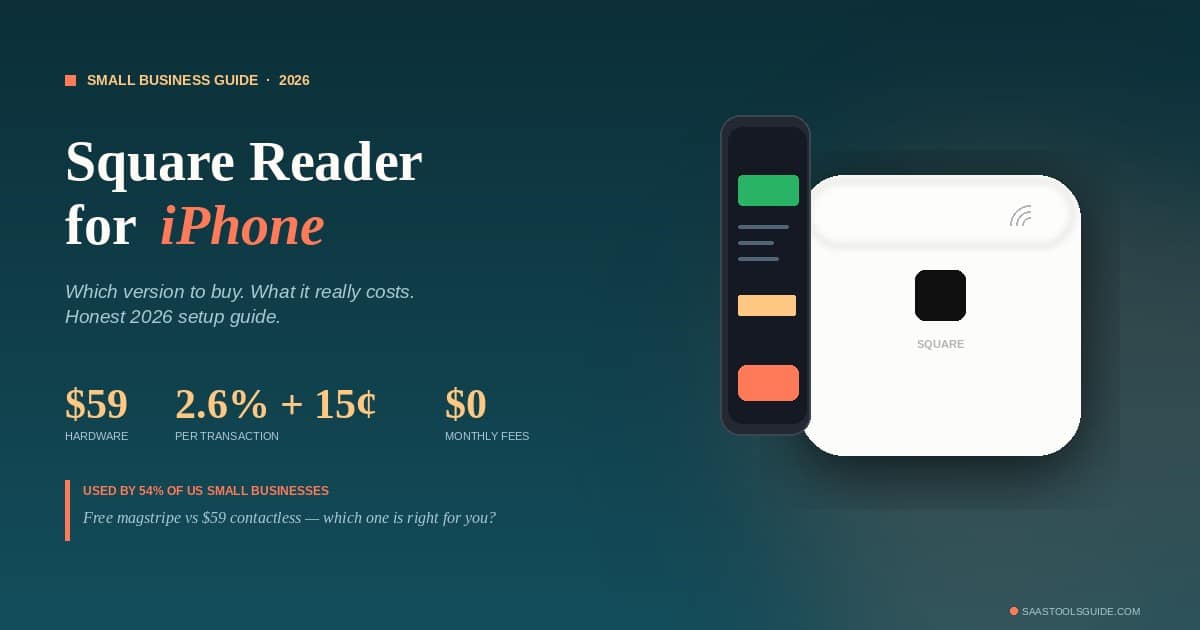
If you’re a small business owner, freelancer, market vendor, or food truck operator looking to take credit card payments from your iPhone, the Square Reader is almost certainly the first product you’ve heard about — and statistically, it’s the one you’ll probably end up buying. Square powers payments for roughly 54% of US small businesses, holds about 27–28% of the entire US point-of-sale market, and processes around $210–228 billion in annual gross payment volume.
But “Square Reader for iPhone” actually refers to two different products at two different price points, with two completely different feature sets. Picking the wrong one — or assuming the cheap option is “good enough” — is the most common mistake new sellers make. This guide breaks down which version you actually need, how it works on a modern iPhone, what it really costs to use, and how it stacks up against PayPal Zettle, SumUp, Clover Go, and Stripe.
The Two Versions of Square Reader, and Why It Matters
There are two Square Readers that work with iPhone, and they are not interchangeable. The differences matter, especially if you have a newer iPhone.
1. Square Reader for Magstripe (Lightning Connector)
This is the small white square that plugs directly into your iPhone’s port. It only accepts swipe payments — no chip, no tap.
- Price: First one is free from Square; additional units around $10
- Connection: Lightning port (older iPhones: 14 and earlier)
- Accepts: Magnetic stripe (swipe) only
- 2026 reality check: iPhone 15 and newer use USB-C, not Lightning. If you have a recent iPhone, this reader doesn’t physically fit without an adapter, and Square’s official guidance is to use the Bluetooth contactless reader instead.
- Magstripe limitation: Swipe payments have higher chargeback liability than chip or contactless under EMV rules. You’re on the hook for fraud losses that chip-and-tap would have prevented.
Honest verdict: The free magstripe reader is a relic. It exists for backward compatibility, not as a recommended product. If you’re starting in 2026, skip it.
2. Square Reader for Contactless and Chip (2nd Generation)
This is the flagship model — the one most people actually mean by “Square Reader for iPhone” today.
- Price: $59 direct from Square, often $47–$59 at Best Buy, Target, Apple, or Amazon
- Connection: Wireless via Bluetooth LE 5.3 (works with any iPhone running iOS 15 or later)
- Accepts: EMV chip cards (dip), contactless tap (Apple Pay, Google Pay, Samsung Pay, NFC cards), and magstripe swipe via a built-in slot
- Battery: All-day battery, 20% longer than the 1st generation, USB-C charging
- Offline mode: Accept payments for up to 24 hours without an internet connection
- Size: ~2.6″ × 2.6″ × 0.4″, weighs about 2 oz — fits in a pocket
- Pairing: Stays connected once paired; no daily re-pairing required
This is the right product for almost every US small business in 2026. The rest of this guide assumes you’re considering this version.
What It Actually Costs to Use Square Reader
Hardware is the cheap part. Where Square makes its money is on transaction fees, and this is where you need to do the math honestly.
| Payment type | Square fee |
|---|---|
| In-person tap, dip, or swipe | 2.6% + 15¢ per transaction |
| Manually keyed-in card numbers | 3.5% + 15¢ |
| Online and invoice payments | 2.9% + 30¢ |
| Afterpay (buy now, pay later) | 6% + 30¢ |
| Monthly fees | $0 |
| Setup or contract fees | $0 |
| PCI compliance fees | $0 |
| Chargeback fees | $0 |
What this looks like in practice:
- A typical $50 in-person sale costs $1.45 in fees
- $1,000/month in card sales = ~$30/month in fees
- $5,000/month in card sales = ~$148/month in fees
- $25,000/month in card sales = ~$735/month in fees
There’s also a “custom rate” option Square offers to high-volume sellers (typically $250,000+ in annual processing). If you’re approaching that threshold, it’s worth a phone call — flat-rate pricing stops being competitive at scale.
Funding: Standard transfers to your linked US bank account arrive next business day, free. Instant transfers are available for an extra 1.75% of the transferred amount if you can’t wait.
Why Square Dominates the US Small Business Market
The numbers are striking. Out of roughly 34.8 million US small businesses, more than half are using Square in some capacity — and the dominance is even stronger in retail (about 42% of Square users are retail-focused). The reasons aren’t mysterious:
1. Genuinely zero upfront cost option. The free magstripe reader was Square’s original wedge into the market, and even though it’s outdated now, the brand association with “free to start” remains powerful.
2. Free POS app with everything. Square Point of Sale handles inventory, digital receipts, tipping, sales reports, customer profiles, and tax tracking at no monthly cost. Specialized free apps cover restaurants, retail, and appointment-based services.
3. Next-day funding by default. Most other processors take 2–3 business days to deposit. Square’s next-business-day standard is meaningful for cash-flow-sensitive small businesses.
4. Apple Pay support is a bigger deal than people realize. Around 58–60% of US in-person card transactions are now contactless, and over 90% of US consumers have used Apple Pay or a similar wallet at some point. The contactless-and-chip Square Reader handles all of this natively.
5. No contracts. You can stop using Square at any time with no penalty. For new businesses where uncertainty is high, this is genuinely valuable.
The combined effect: Square’s reported 4 million+ active sellers globally (vast majority US-based), processing roughly $210–228 billion annually, with ~78% of stores in the US.
Setting Up Square Reader on iPhone (10 Minutes, Once)
The setup process is one of Square’s strongest selling points — most users are taking their first payment within 15 minutes of opening the box.
- Create a free Square account at squareup.com using your business email. You’ll provide basic business info (name, type, EIN or SSN, US bank account for deposits).
- Charge the reader fully before first use (USB-C cable included).
- Install the Square Point of Sale app from the App Store on your iPhone (iOS 15 or later required).
- Pair the reader via Bluetooth. In the Square POS app: Settings → Card Readers → Connect a Reader → Contactless and Chip Reader. Follow the on-screen prompts.
- Process a test transaction for $1 to yourself before your first real sale. This validates the bank account link and confirms the reader is working.
After the first pairing, the reader stays connected to your iPhone — no daily re-pairing needed.
Where Square Reader Falls Short
This is the section most “best card reader” articles skip. Square is excellent for what it does, but it’s not the optimal choice for every business.
1. Flat-rate pricing gets expensive at high volumes. At 2.6% + 15¢, every $1,000 in card sales costs you about $30. Once you’re processing $20,000+ per month consistently, providers offering interchange-plus pricing (where you pay actual card network costs plus a small markup) often save 0.3–0.7 percentage points — which can mean $1,000+ per month in saved fees at meaningful volume.
2. The 6% Afterpay rate is steep. If buy-now-pay-later is a meaningful part of your sales, the 6% + 30¢ rate is among the highest in the industry. Many competitors offer 4–5%.
3. Account holds and freezes. Square’s automated risk system will occasionally freeze funds for review, especially for new accounts processing unusually large transactions or unfamiliar customer types. This is rare, but when it happens, resolution can take 1–4 business days. For businesses living transaction-to-transaction on cash flow, this is a real risk.
4. Bluetooth pairing can occasionally glitch. Reviewers consistently rate the 2nd-generation reader 4.5–4.7 out of 5, with the most common complaint being occasional Bluetooth re-pairing needs. It’s rare on the 2nd-gen model with 5.3 LE, but not unheard of.
5. Magstripe-only version has higher fraud liability. Under EMV liability shift rules, if a chip card is swiped instead of dipped and the transaction turns out to be fraudulent, the merchant — not the issuer — eats the loss. This is exactly why you should pay the $59 for the contactless and chip model.
Square Reader vs. The Top Competitors (2026 Data)
If you’re choosing between Square and another mobile payment option for iPhone, here’s the honest side-by-side:
| Reader | Hardware Cost | In-Person Fee | Monthly Fees | Best For |
|---|---|---|---|---|
| Square Reader (contactless + chip) | $59 | 2.6% + 15¢ | $0 | Beginners, mobile sellers, simplicity |
| PayPal Zettle Reader | $29 first / $79 additional | 2.29% + 9¢ | $0 | Lowest in-person fees, PayPal users |
| SumUp Air or Solo | $54–$99 | 2.6% + 10¢ (or flat 2.6%) | $0 (optional paid plan available) | Ultra-low entry, occasional sellers |
| Clover Go | $49–$199 | ~2.6% + 10¢ (varies by provider) | $0–$14.95 | Sellers wanting full POS features |
| Stripe Reader M2 | ~$59 | 2.7% + 5¢ | $0 (developer-focused) | Tech-savvy sellers, app developers |
The fee math at $50 per transaction:
- Square: $1.45
- PayPal Zettle: $1.24 (saves 21¢)
- SumUp: $1.40 (saves 5¢)
- Clover Go: ~$1.40 (saves 5¢)
- Stripe: $1.40 (saves 5¢)
That 21¢ difference between Square and PayPal Zettle compounds. At 1,000 transactions a year averaging $50, you’d save $210 by choosing Zettle. At 5,000 transactions, over $1,000.
But fees aren’t everything. Square’s free POS app, ecosystem, and 24-hour offline mode have genuine value. PayPal Zettle’s interface is less polished. SumUp’s reporting is thinner. Clover’s pricing varies wildly by which merchant services provider sold it to you. Stripe is built for developers, not for someone running a coffee cart.
When Square Reader Is the Right Choice
Buy the Square Reader for contactless and chip if:
- You’re processing under $50,000–$100,000 per year in card payments. Below that volume, the fee differences with competitors are small enough that Square’s superior software and ease of use win.
- You sell at markets, pop-ups, events, or other mobile contexts where simple Bluetooth connection and offline mode matter.
- You’re a first-time card-payment seller who values setup speed, no contracts, and a brand you can trust to be around in five years.
- You want next-business-day deposits without paying for instant transfers.
- You sell to mostly US customers using Apple Pay — the contactless support is excellent.
When You Should Probably Pick Something Else
Skip Square in favor of an alternative if:
- You’re processing more than $20,000 per month consistently — at that scale, an interchange-plus provider (Helcim, Stax, or a traditional merchant services account) typically saves significant money, even with their setup complexity
- Fees are your single most important factor and you don’t mind PayPal Zettle’s slightly less polished software
- You’re a developer or technical business building custom payment flows — Stripe is purpose-built for that
- You need deep restaurant or retail-specific POS features beyond what Square’s free apps cover — full Clover or Toast deployments make more sense
- You want Tap to Pay on iPhone with no hardware at all — a free option Apple now supports natively, though it doesn’t accept chip or swipe cards (Square offers this too, alongside its hardware reader)
FAQs About Square Reader for Iphone
Does the Square Reader work with all iPhones? The contactless and chip reader (2nd generation) works with any iPhone running iOS 15 or later, including iPhone 15 and 16 with USB-C, because it pairs wirelessly via Bluetooth and doesn’t plug into the phone’s port. The older magstripe-only reader uses a Lightning connector and won’t fit USB-C iPhones without an adapter.
Do I need an internet connection to take payments? For real-time processing, yes. But Square’s offline mode lets you accept payments for up to 24 hours without internet. Transactions are stored on your iPhone and processed when you reconnect. You’re responsible for any payments that decline after the fact, so it’s best for low-risk, low-value transactions.
How fast does money reach my bank account? Standard transfers arrive next business day at no charge. Instant transfers are available 24/7 for a 1.75% fee. There’s no minimum deposit threshold — Square will transfer whatever you’ve processed.
Are there any monthly fees with Square? No. The free Square Point of Sale account has no monthly fees, no contracts, no PCI compliance fees, and no minimum processing requirements. You only pay the per-transaction fees when you actually take payments.
Is Square Reader safe and PCI compliant? Yes. The reader uses end-to-end encryption from the moment a card is read, and Square handles all PCI compliance on the merchant’s behalf. Card data never touches your iPhone in unencrypted form.
Can I accept Apple Pay with the Square Reader? Yes — the contactless and chip model accepts Apple Pay, Google Pay, Samsung Pay, and NFC-enabled credit and debit cards. Around 58–60% of US in-person card transactions are now contactless, so this is essential.
What happens if a customer disputes a payment? Square charges no chargeback fees, and they provide a dispute resolution process where you can submit evidence. However, swipe transactions on the magstripe-only reader carry higher merchant liability under EMV rules — another reason the $59 contactless and chip model is the right choice in 2026.
Do I need a separate business bank account? No, but it’s strongly recommended. Square will deposit to a personal checking account, but separating business and personal finances makes taxes, accounting, and business credit applications much easier.
Can I use the same Square Reader on multiple iPhones? Yes. The reader pairs via Bluetooth and can be unpaired from one iPhone and paired with another. Many small businesses with multiple staff share one reader by passing it between devices.
What’s the difference between Square Reader and Square Terminal? The Square Reader is a small accessory that pairs with your iPhone. Square Terminal is a standalone device with its own screen, receipt printer, and built-in payment processor — it costs $299 and is suited for fixed-location businesses that don’t want to use a phone for checkout.
The Bottom Line
For a US small business owner taking payments on an iPhone in 2026, the Square Reader for contactless and chip (2nd generation) at $59 is the smartest, lowest-friction starting point. The combination of zero monthly fees, free POS software, next-business-day deposits, no contracts, and strong contactless support makes it the right answer for the overwhelming majority of mobile and low-volume sellers.
The free magstripe-only reader is technically still available but isn’t worth using in 2026 — newer iPhones don’t accept its Lightning connector, and swipe-only acceptance carries unnecessary fraud risk.
Once you cross roughly $20,000 in monthly card volume, it’s worth running the math against PayPal Zettle (lower fees) or interchange-plus providers (lower fees, more setup complexity). Until then, Square’s simplicity is genuinely worth the small premium per transaction. That’s why 54% of US small businesses are already using it.
For more guides on tools that actually work for small business owners and solopreneurs, see our best AI tools for solopreneurs in 2026.