Claude AI is an AI assistant built to help people with writing, research, analysis, coding, and business tasks. It can answer questions, summarize long documents, generate content, explain ideas, and support everyday work. In this guide, I will explain what Claude AI is, how it works, what it can do, and whether it is worth using.
What Is Claude AI?
Claude AI is a conversational AI assistant created by Anthropic. In simple words, it is a chatbot that understands natural language and responds in a human-like way. You can type a question, request, or instruction, and Claude will try to help with tasks such as writing, reasoning, coding, summarizing, and analysis. Anthropic describes Claude as an AI platform that excels at language, reasoning, analysis, and coding.
Who Created Claude AI?
Anthropic created Claude AI. Anthropic is an AI company that focuses on building helpful and safe AI systems. The company has published research and policy material around AI safety, model behavior, and responsible development. Claude became popular because many users found it useful for practical work such as document review, brainstorming, content creation, and coding support.
How Does Claude AI Work?
Claude AI uses a large language model, or LLM. That means it reads your prompt, looks at the words and meaning in context, and then generates a response that matches your request. This is why Claude can answer questions, rewrite text, explain topics, summarize reports, and help solve problems in a conversational way. Anthropic also states that Claude can handle language, reasoning, analysis, coding, and document-based work.
One reason many people like Claude is its ability to work with long inputs. Anthropic offers models with large context capabilities, including a 1M token context window in beta on parts of its platform. In practice, that means Claude can work through long files, research materials, detailed instructions, and large sets of notes more effectively than many users expect from a chatbot.
Main Features of Claude AI
Natural Language Conversations
Claude lets users interact in plain English instead of technical commands. You can ask simple questions, give detailed instructions, or hold a back-and-forth conversation to improve the output. Anthropic presents Claude as an assistant that helps users think through complex work and break down problems.
Content Writing and Editing
Claude can help draft blog posts, website copy, emails, summaries, product descriptions, and social media content. It can also rewrite sentences, improve clarity, fix tone, and simplify complex ideas. This makes it useful for writers, marketers, and business owners who need clean and fast first drafts. This use is consistent with Anthropic’s positioning of Claude for writing and professional work.
Document Summarization
Claude is very useful for reading and summarizing long content. You can paste reports, meeting notes, PDFs, transcripts, or research materials and ask Claude to extract key points, actions, and insights. Anthropic explicitly highlights Claude for analysis and document-heavy workflows.
Coding Help
Claude can help developers write code, explain code, debug errors, and suggest improvements. Anthropic’s official materials describe current Claude models as strong options for coding and professional work.
Research Assistance
Claude can support research by organizing ideas, summarizing sources, comparing options, and helping users think through detailed topics. It does not replace expert review, but it can speed up the early stages of research and analysis. Anthropic describes Claude as useful for reasoning and analysis tasks.
Long Context Window
A major strength of Claude is its ability to work with long prompts and large documents. This feature is especially helpful for businesses, researchers, editors, and legal or operational teams that deal with large files and detailed instructions. Anthropic states that some Claude offerings support very large context windows, including 1M tokens in beta on the Claude Platform for certain use cases.
Business and Productivity Support
Claude can support daily business work such as drafting reports, building outlines, reviewing policies, writing internal documentation, and organizing workflows. Anthropic also provides business-focused resources for professional use.
What Can Claude AI Be Used For?
Claude AI fits many real-world tasks. People use it for blog writing, email drafting, summarizing reports, brainstorming ideas, creating outlines, supporting customer service content, coding, debugging, and academic or research help. For teams, it can also help with internal communication, planning, documentation, and review work. These use cases align with Anthropic’s published positioning for writing, reasoning, analysis, coding, and professional workflows.
Claude AI vs ChatGPT
Key Similarities
Claude AI and ChatGPT are both AI assistants that respond to natural language prompts. Both can help with writing, brainstorming, explanations, coding, and productivity tasks. Both aim to make complex work faster and easier.
Main Differences
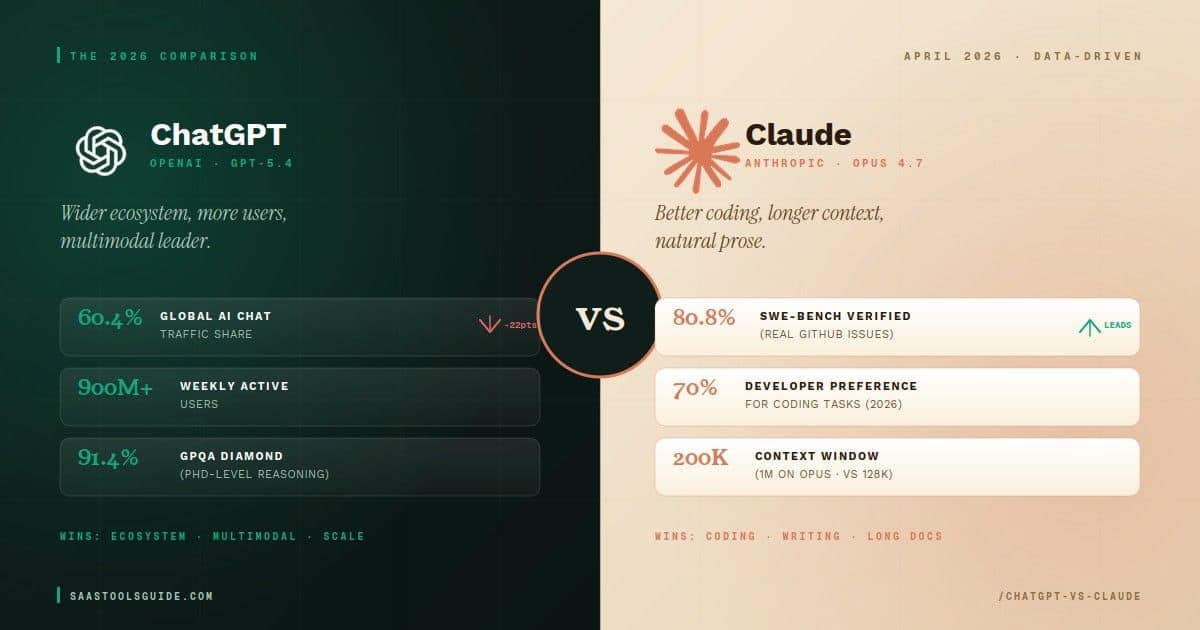
Claude is built by Anthropic, while ChatGPT is built by OpenAI. Claude is often discussed for its strong document handling and long-context work, while different users may prefer ChatGPT for other workflows. The better tool depends on what you need, how you work, and which features matter most to you. Anthropic’s own materials strongly position Claude for analysis, coding, professional work, and long-input tasks.
Which One Is Better for Different Tasks?
For writing, both tools can perform well. For research and long-document analysis, Claude may stand out for users who need to work with larger inputs. For coding, Anthropic now markets some Claude models as especially strong for coding and enterprise work. For business use, Claude offers team and enterprise plans. For ease of use, both tools are designed to work through simple prompts and follow-up questions.
Benefits of Using Claude AI
Claude is easy to use because it works through simple conversation. It helps users generate content quickly, review long materials, and organize ideas faster. It also supports productivity for solo users and teams. One of its biggest strengths is document handling and long-form analysis. For many professionals, that makes it useful for research, writing, planning, and internal business tasks.
Limitations of Claude AI
Claude is helpful, but it is not perfect. It can still make mistakes, misunderstand context, or give incomplete answers. Information may also be outdated or limited depending on the task and the source material provided. It should not replace human judgment, expert review, or fact-checking for important decisions. Also, some advanced capabilities depend on which plan or product access a user has.
Is Claude AI Free?
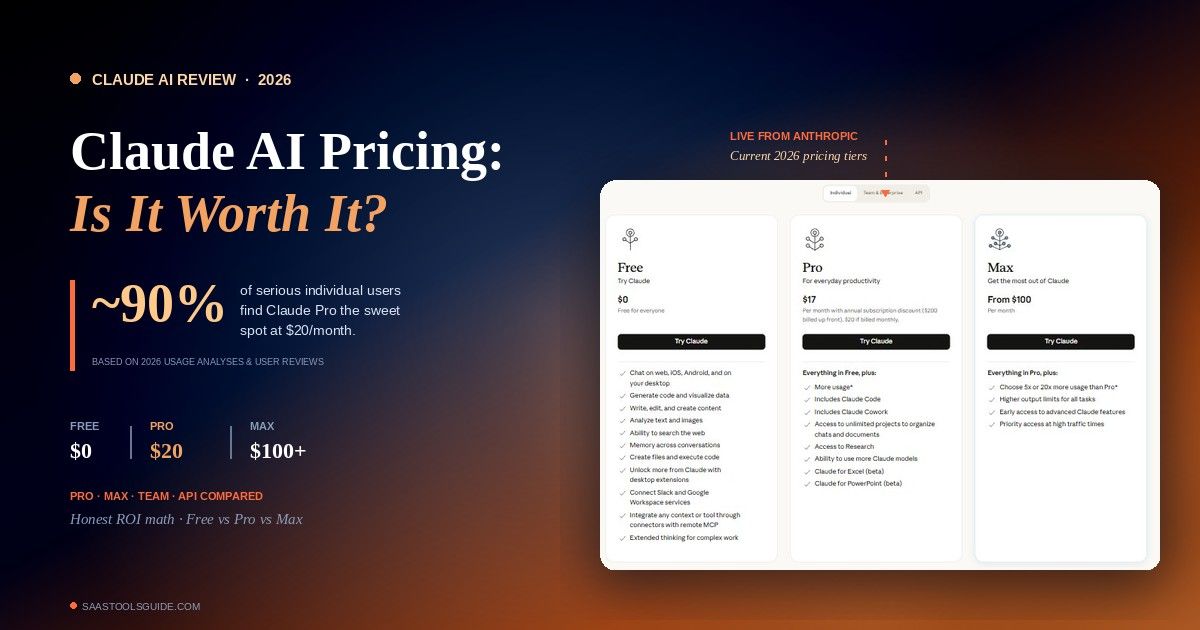
Claude offers both free and paid options. Anthropic’s pricing page lists Free, Pro, Max, Team, and Enterprise tiers, and the help center also lists Free at $0, Pro at $20 per month, and higher-priced Max plans for heavier usage. Features and usage capacity vary by plan, so free users should expect more limits than paid users.
Is Claude AI Safe to Use?
Anthropic places strong emphasis on AI safety and responsible development. The company publishes research, policy work, and safety materials around how it develops and deploys models. That said, users should still be careful. It is smart to avoid sharing highly sensitive personal, legal, financial, or business data unless you fully understand the platform’s policies and your organization’s rules.
How to Use Claude AI
Sign Up or Access the Platform
You can start by visiting Claude through Anthropic’s website or supported products. Anthropic offers consumer plans and developer platform access.
Enter a Prompt
Once inside, type a clear prompt. You can ask Claude to write, summarize, explain, compare, analyze, or brainstorm.
Refine the Response
If the first answer is not perfect, ask a follow-up question. You can request a shorter version, a different tone, a step-by-step answer, or a more detailed explanation.
Use It for Daily Workflows
The best way to use Claude is to make it part of daily work. Use it for notes, emails, blog ideas, meeting summaries, research support, and first drafts.
Best Prompts to Use With Claude AI
Here are a few practical prompt ideas:
- Summarize this report in simple language
- Create a blog outline on this topic
- Write a professional email reply
- Rewrite this paragraph in a clearer tone
- Analyze this document and list key points
- Brainstorm marketing ideas for my business
These prompt types match Claude’s strengths in writing, analysis, document work, and professional productivity.
Who Should Use Claude AI?
Claude AI can help many kinds of users. Students can use it for study support and summaries. Writers can use it for drafting and editing. Marketers can use it for outlines, content ideas, and messaging. Business owners can use it for planning and communication. Developers can use it for coding help. Researchers can use it for analysis and synthesis. Customer service teams can use it for response drafting and internal knowledge support.
Is Claude AI Worth It?
Claude AI is worth considering if you need help with writing, long-document analysis, reasoning, coding, or day-to-day productivity. It is especially strong for users who work with detailed prompts and large amounts of text. Still, the right choice depends on your needs, task type, and budget. Free access may be enough for light use, while paid plans make more sense for regular professional work.
Frequently Asked Questions About Claude AI
What is Claude AI used for?
Claude AI is used for writing, summarizing, analysis, coding, brainstorming, and professional productivity tasks.
Is Claude AI better than ChatGPT?
There is no single winner for everyone. Claude may be stronger for some document-heavy or long-context tasks, while other users may prefer ChatGPT for different workflows.
Is Claude AI free or paid?
Claude offers both free and paid plans.
Can Claude AI write content?
Yes. Claude can help write, rewrite, and edit many kinds of content.
Can Claude AI help with coding?
Yes. Anthropic positions Claude as strong for coding and professional technical work.
Is Claude AI good for business use?
Yes. Claude offers team and enterprise options and is designed to support professional workflows.
Final Thoughts
Claude AI is an AI assistant from Anthropic that helps with writing, research, analysis, coding, and business tasks. It works through natural language, supports long documents, and fits many personal and professional workflows. For beginners, the main takeaway is simple: Claude can save time and improve productivity, but you should still review its output carefully before using it for important work.